TourOptimizer REST Server
Deploy and operate JOpt.TourOptimizer as a reactive Spring WebFlux service with an OpenAPI 3 contract.
Overview
- Helpful links
- Why WebFlux and reactive
- Swagger and OpenAPI
- Run locally with Docker
- Endpoint groups and feature flags
- Configuration reference
- Container environment variables
Helpful links
- Docker image: https://hub.docker.com/r/dnaevolutions/jopt_touroptimizer
- REST client documentation: /docs/learn-and-explore/rest/rest_client_touroptimizer
- Sandboxes: /docs/learn-and-explore/feature-guides/jopt-sandboxes
- Self-hosting repository: https://github.com/DNA-Evolutions/Docker-REST-TourOptimizer
Why WebFlux and reactive
Optimization services run in bursty, concurrent scenarios: batch planning, interactive UI runs, multiple teams submitting jobs simultaneously, CI regression pipelines. TourOptimizer uses Spring WebFlux and reactive patterns to keep the HTTP layer non-blocking, support high concurrency for status and progress polling without thread starvation, and integrate naturally with the reactive event streams emitted by the Java core engine (progress percentages, warnings, errors, status transitions). The optimizer itself is compute-heavy and runs on its own thread pool. WebFlux keeps the service layer scalable and responsive regardless of how many connections are open.
Swagger and OpenAPI
The OpenAPI schema is derived from the snapshot model inside the Java library via annotations. The REST contract always matches the SDK snapshot definition, generated clients stay aligned with the server, and snapshots remain reproducible across environments.
- Swagger UI:
http://localhost:8081/swagger-ui/index.html - OpenAPI JSON:
http://localhost:8081/v3/api-docs
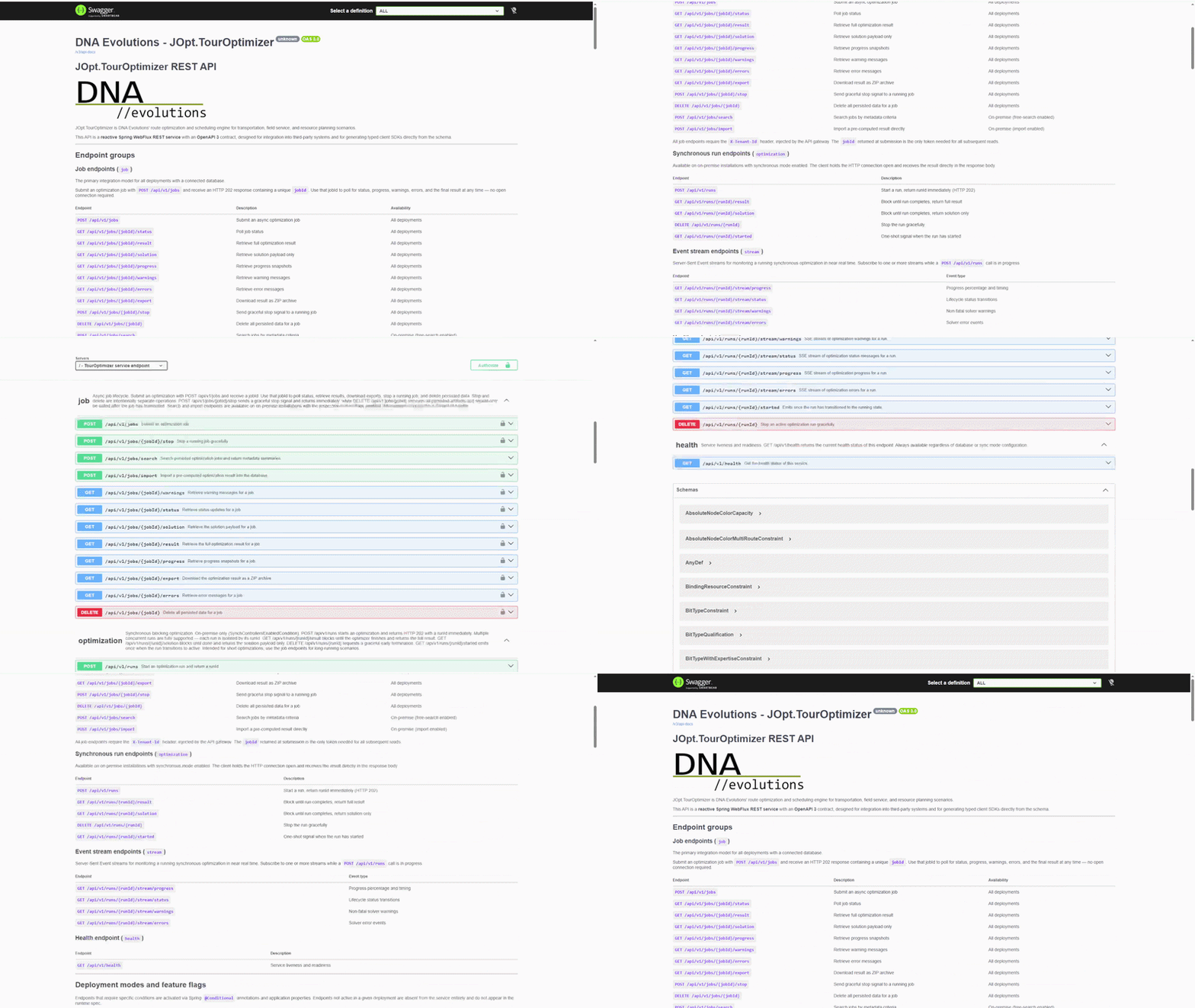 Swagger Endpoint UI
Run locally with Docker
Minimal start (sync mode only, no database):
docker run -d --rm --name jopt-touroptimizer \
  -p 8081:8081 \
  -e SPRING_PROFILES_ACTIVE=cors \
  dnaevolutions/jopt_touroptimizer:latest
Full start (all features enabled — sync + database + all endpoints):
# Step 1 — Create a network
docker network create mongonetwork

# Step 2 — Start MongoDB
docker run -d --name dnamongo --network mongonetwork \
  -p 27017:27017 \
  -e MONGO_INITDB_ROOT_USERNAME=dnauser \
  -e MONGO_INITDB_ROOT_PASSWORD=dnapwd \
  mongo:latest

# Step 3 — Start TourOptimizer
docker run --rm --name jopt-touroptimizer \
  --network mongonetwork \
  -p 8081:8081 \
  -e SPRING_PROFILES_ACTIVE=cors \
  -e DNA_DATABASE_ACTIVE=true \
  -e DNA_DATABASE_URI="mongodb://dnauser:dnapwd@dnamongo:27017/admin" \
  -e DNA_DATABASE_DB=touroptimizer \
  -e DNA_SHOW_SYNCH_CONTROLLERS=true \
  -e DNA_DATABASE_FREE_SEARCH_ENABLED=true \
  -e DNA_DATABASE_JOB_IMPORT_ENABLED=true \
  -e DNA_WEBHOOK_VALIDATION=relaxed \
  dnaevolutions/jopt_touroptimizer:latest
If your REST client runs inside another container on the same machine, use http://host.docker.internal:8081 instead of http://localhost:8081.
For platform-specific deployment help see:
- JOpt TourOptimizer on Linux
- JOpt TourOptimizer on Windows
- JOpt TourOptimizer on macOS
- Kubernetes
- Terraform / Enterprise
Endpoint groups and feature flags
Endpoints are activated conditionally based on application properties and environment variables. Endpoints that are not active in a given deployment are absent from the service and do not appear in the runtime OpenAPI spec.
Job endpoints (/api/v1/jobs/*)
The primary integration model for all deployments with a connected database. Submit a job and receive a jobId. Use that token to poll and retrieve results at any time without holding an HTTP connection open. Requires DNA_DATABASE_ACTIVE=true.
| Method | Path | Description | Condition |
|---|---|---|---|
POST | /api/v1/jobs | Submit an async optimization job | Database |
GET | /api/v1/jobs/{jobId}/result | Retrieve the full optimization result | Database |
GET | /api/v1/jobs/{jobId}/solution | Retrieve the solution payload only | Database |
GET | /api/v1/jobs/{jobId}/status | Poll job status | Database |
GET | /api/v1/jobs/{jobId}/progress | Retrieve progress snapshots | Database |
GET | /api/v1/jobs/{jobId}/warnings | Retrieve warning messages | Database |
GET | /api/v1/jobs/{jobId}/errors | Retrieve error messages | Database |
GET | /api/v1/jobs/{jobId}/export | Download result as a ZIP archive | Database |
POST | /api/v1/jobs/{jobId}/stop | Send graceful stop signal to a running job | Database |
DELETE | /api/v1/jobs/{jobId} | Delete all persisted data for a job | Database |
POST | /api/v1/jobs/search | Search jobs by metadata criteria | Database + free-search enabled |
POST | /api/v1/jobs/import | Import a pre-computed result without running the optimizer | Database + import enabled |
All job endpoints require the X-Tenant-Id header. In SaaS deployments this is injected by the API gateway. In local and on-premise deployments any fixed string is acceptable (for example local or my-tenant).
Synchronous run endpoints (/api/v1/runs/*)
For short optimizations (up to a few minutes) where holding the connection open is acceptable. Each run is isolated by a runId — multiple concurrent runs are fully supported. Requires DNA_SHOW_SYNCH_CONTROLLERS=true.
| Method | Path | Description |
|---|---|---|
POST | /api/v1/runs | Start a run, return runId immediately (HTTP 202) |
GET | /api/v1/runs/{runId}/result | Block until done, return the full result |
GET | /api/v1/runs/{runId}/solution | Block until done, return the solution only |
DELETE | /api/v1/runs/{runId} | Stop the run gracefully |
GET | /api/v1/runs/{runId}/started | One-shot signal when the run transitions to active |
For optimizations that take longer than a few minutes, use the job endpoints instead.
SSE stream endpoints (/api/v1/runs/{runId}/stream/*)
Server-Sent Event streams scoped to a specific sync run. Subscribe while the run is in progress to receive live events. Each run has independent, isolated stream subscriptions. Requires DNA_SHOW_SYNCH_CONTROLLERS=true.
| Method | Path | Event type |
|---|---|---|
GET | /api/v1/runs/{runId}/stream/progress | Progress percentage and timing |
GET | /api/v1/runs/{runId}/stream/status | Lifecycle status transitions |
GET | /api/v1/runs/{runId}/stream/warnings | Non-fatal solver warnings |
GET | /api/v1/runs/{runId}/stream/errors | Solver error events |
Health endpoint
| Method | Path | Description |
|---|---|---|
GET | /api/v1/health | Service liveness and readiness |
Configuration reference
JOpt / DNA properties
| Property | Default | Environment variable | Description |
|---|---|---|---|
touroptimizer.debug.active | false | DNA_IS_DEBUG | Enable debug mode |
touroptimizer.elementslimit.active | false | DNA_HAS_ELEMENT_LIMITS | Cap the number of nodes and resources per request |
touroptimizer.elementslimit.count | 100 | DNA_ELEMENT_LIMITS_COUNT | Limit cap. Only active when elementslimit.active=true |
touroptimizer.security.database-enabled | true | DNA_DATABASE_ACTIVE | Enable MongoDB and all job endpoints |
touroptimizer.security.database-download-enabled | true | DNA_DATABASE_DOWNLOAD_ACTIVE | Enable result download endpoints |
touroptimizer.security.database-clean-rate-seconds | 7200 | DNA_DATABASE_CLEAN_SECONDS | How often (in seconds) to scan for expired documents |
touroptimizer.security.database-free-search-enabled | true | DNA_DATABASE_FREE_SEARCH_ENABLED | Enable POST /api/v1/jobs/search |
touroptimizer.security.database-job-import-enabled | true | DNA_DATABASE_JOB_IMPORT_ENABLED | Enable POST /api/v1/jobs/import |
touroptimizer.security.kms-provider | none | DNA_KMS_PROVIDER | KMS provider: none, local (dev), or azure (production) |
touroptimizer.security.webhook-validation | strict | DNA_WEBHOOK_VALIDATION | Webhook URL validation policy: strict (HTTPS + public addresses only), relaxed (HTTP + private addresses allowed), none (no validation, local dev only) |
touroptimizer.security.default-lic | (empty) | DNA_DEFAULT_LIC | Default fallback JSON license string |
touroptimizer.security.plugins-enabled | true | DNA_PLUGINS_ACTIVE | Enable optimization plugins |
touroptimizer.security.protection-enabled | false | DNA_SECURITY_ENABLED | Enable password protection on Swagger UI |
touroptimizer.security.user | dna | DNA_USER | Username for Swagger UI password protection |
touroptimizer.security.password | jopt | DNA_USER | Password for Swagger UI password protection |
touroptimizer.security.whitelistips | (empty) | DNA_IP_WHITELIST | Comma-separated list of allowed IP addresses |
touroptimizer.security.server-url | / | DNA_SERVER_URL | Base server URL shown in the OpenAPI spec |
touroptimizer.controller.show-synch | true | DNA_SHOW_SYNCH_CONTROLLERS | Enable synchronous run and stream endpoints |
touroptimizer.controller.show-deprecated | false | DNA_SHOW_DEPRECATED_CONTROLLERS | Enable legacy controller paths (to be removed) |
Spring / WebFlux / springdoc properties
| Property | Default | Description |
|---|---|---|
server.port | 8081 | HTTP listen port |
server.http2.enabled | true | Enable HTTP/2 |
server.compression.enabled | true | Enable response compression |
server.compression.min-response-size | 1024 | Minimum response size to compress (bytes) |
server.forward-headers-strategy | framework | Reverse proxy header handling |
server.error.include-message | always | Include error message in HTTP error responses |
spring.data.mongodb.uri | mongodb://dnauser:dnapwd@localhost:27017/admin | MongoDB connection URI (env: DNA_DATABASE_URI) |
spring.data.mongodb.database | touroptimizer | MongoDB database name (env: DNA_DATABASE_DB) |
spring.http.codecs.max-in-memory-size | 250MB | Maximum in-memory buffer for reactive codec |
spring.banner.location | classpath:/banner/touroptimizerbanner.txt | Spring Boot startup banner |
spring.output.ansi.enabled | DETECT | ANSI colour in banner and logs: DETECT, ALWAYS, or NEVER |
springdoc.api-docs.enabled | true | Serve the OpenAPI JSON document |
springdoc.api-docs.path | /v3/api-docs | OpenAPI JSON path (env: DNA_API_DOCS_PATH) |
springdoc.api-docs.version | OPENAPI_3_0 | OpenAPI spec version |
springdoc.swagger-ui.disable-swagger-default-url | true | Suppress the default Swagger petstore URL |
springdoc.writer-with-default-pretty-printer | true | Pretty-print the OpenAPI JSON |
springdoc.show-actuator | false | Include actuator endpoints in Swagger UI |
debug | false | Spring Boot debug logging (env: DNA_SERVER_DEBUG) |
Container environment variable summary
| Variable | Default | Purpose |
|---|---|---|
SPRING_PROFILES_ACTIVE | (none) | Spring profile selection. Use cors to enable browser-friendly CORS. |
DNA_DATABASE_ACTIVE | true | Enable MongoDB and all job endpoints |
DNA_DATABASE_URI | mongodb://dnauser:dnapwd@localhost:27017/admin | MongoDB connection string |
DNA_DATABASE_DB | touroptimizer | MongoDB database name |
DNA_SHOW_SYNCH_CONTROLLERS | true | Enable sync run endpoints |
DNA_DATABASE_FREE_SEARCH_ENABLED | true | Enable the job search endpoint |
DNA_DATABASE_JOB_IMPORT_ENABLED | true | Enable the job import endpoint |
DNA_KMS_PROVIDER | none | KMS provider: none, local, or azure |
DNA_WEBHOOK_VALIDATION | strict | Webhook URL validation: strict, relaxed, or none |
DNA_SHOW_DEPRECATED_CONTROLLERS | false | Show legacy controller paths |
JAVA_TOOL_OPTIONS | (none) | JVM flags (memory, GC tuning, diagnostics) |
References
- DockerHub: https://hub.docker.com/r/dnaevolutions/jopt_touroptimizer
- Self-hosting repo: https://github.com/DNA-Evolutions/Docker-REST-TourOptimizer
- Docker variables reference: https://github.com/DNA-Evolutions/Docker-REST-TourOptimizer/blob/main/TourOptimizerDockerVars.md
A product by DNA Evolutions GmbH ©
REST-Clients for JOpt.TourOptimizer
JOpt.TourOptimizer can be containerized using Docker, which means that it can be run as a container on any system that has Docker installed. This allows for easy deployment and scaling of the service.
TourOptimizer Production Guide
Jobs, sync runs, runId, jobId, encryption, tenant isolation, and stop/delete lifecycle