JOpt.TourOptimizer Feature List (Basic / Advanced / Expert)
Topic-sorted, decision-oriented, and ready for sharing.
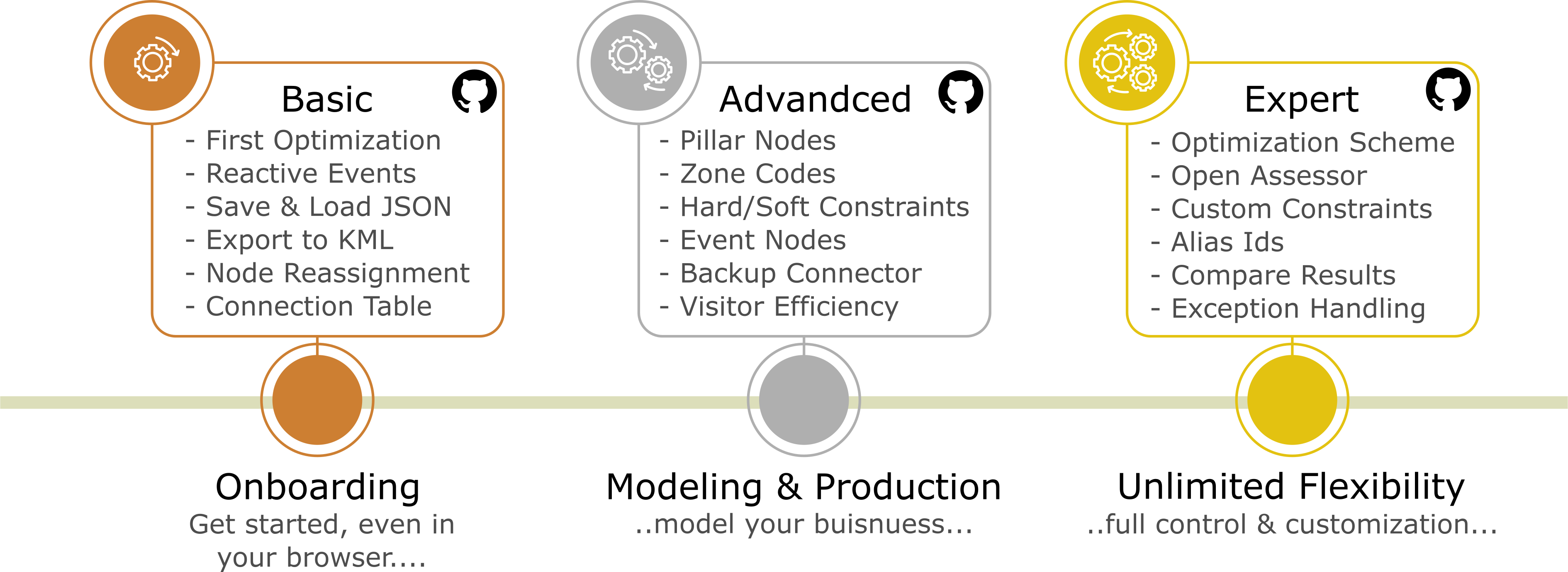
This overview groups features by industry-standard capability areas used in routing, scheduling, dispatch, and optimization platforms. Each row includes a recommended documentation level (Basic / Advanced / Expert) indicating where the feature is typically introduced in the examples.
Cross-cutting: All features are available via the REST API, and snapshots are schema-compatible — meaning you can use these capabilities from any client (Java, JavaScript, Python, .NET, low-code, etc.).
Topic 1 — Getting started, fundamentals, and interoperability
| Feature | Level | What it enables | When to use (decision hint) |
|---|---|---|---|
| First optimization pipeline | Basic | Minimal working optimization (nodes + resources + run + result) | Always the first validation step in any project |
| Core modeling primitives (nodes/resources/time windows/durations) | Basic | Standard routing/scheduling building blocks | Any operational scenario |
| Read out results (routes, timing, KPIs) | Basic | Extract order, arrivals/departures, totals | Integration, reporting, UI, audits |
| Result output formatting (headers / structured export) | Basic | Consistent downstream consumption | When multiple systems consume results |
| Export to KML | Basic | GIS visualization for stakeholders | “Show it on a map” demos and acceptance |
| ExtraInfo payloads (node/resource metadata) | Expert | Attach domain-specific data without breaking the model | When UI/ERP needs extra payload per stop/vehicle |
| REST API availability for all features | Cross-cutting | Use everything via REST + snapshots from any client | Language-agnostic integrations, platform services |
Topic 2 — Time modeling and schedule realism (constraints, calendar, multi-day)
| Feature | Level | What it enables | When to use (decision hint) |
|---|---|---|---|
| Include visit duration | Advanced | Service time impacts feasibility and objective | Anytime service time is non-trivial |
| Joint visit duration | Advanced | Coupled service-time behavior | When tasks share setup/overhead |
| Wait on early arrival (first node) | Advanced | Realistic waiting behavior at first stop | When early arrival is allowed but should not “teleport time” |
| First / last node modeling | Advanced | Enforce route start/end structure | Depot logic, first/last visit rules |
| Overnight stay | Advanced | Multi-day continuity across routes | Field service, multi-day delivery, overnight planning |
| FlexTime (positive/negative) | Expert | Flexible start-time shifts | When shifting start improves feasibility/acceptance |
| Event nodes | Advanced | Special events inside routes | Breaks, checkpoints, inspections, mandated events |
Topic 3 — Route structure and feasibility by architecture (hard rules)
Important modeling principle: Hard constraints are fulfilled by architecture, not by “very high cost”.
Costs optimize within the feasible space; feasibility must be modeled structurally.
| Feature | Level | What it enables | When to use (decision hint) |
|---|---|---|---|
| Open vs closed route | Advanced | End anywhere vs return behavior | Choose based on operational reality |
| Return-to-start | Advanced | Explicit return requirement | When routes must end at depot/home base |
| Pillar / captured nodes | Advanced | Hard structural sequencing | When a visit position must be fixed structurally |
| Relations (same/different route/visitor + relative time windows) | Expert | Cross-node coupling constraints | When tasks must be together/separate or temporally spaced |
| Optional nodes (general) | Expert | Nodes may be visited or skipped | When stopovers are optional but useful |
Topic 4 — Geographic intelligence, territories, and compliance constraints
| Feature | Level | What it enables | When to use (decision hint) |
|---|---|---|---|
| Open Location Code (Plus Codes) | Advanced | Location identifiers without raw lat/lon | When interfaces use plus codes |
| Territories via zone codes | Advanced | Territory modeling via postal/zone codes | Sales/service territories, compliance regions |
| Zone number constraints | Advanced | Region membership limits and rules | “Only X jobs in zone Y”, zone policies |
| Zone crossing constraints (bridge/tunnel crossing) | Expert | Controlled crossings (counts/limits/penalties) | Tolls, restricted crossings, compliance |
| UK post codes / zone examples | Advanced | Concrete territory modeling patterns | When zones are postal-code driven |
Topic 5 — Travel times, routing data, and network integration
| Feature | Level | What it enables | When to use (decision hint) |
|---|---|---|---|
| External node connections | Basic | Inject travel times/distances externally | When you have authoritative routing data |
| BackupConnector (fallback distance/time) | Advanced | Deterministic fallback when travel data is missing | When travel data is partial |
| ConnectionStore (dynamic/time-dependent) | Expert | Rush hour / weekend / time-dependent travel | When realism depends on time-of-day |
| Custom backup connector strategies | Advanced/Expert | Domain-specific fallback computation | When default fallback is insufficient |
Topic 6 — Resource capabilities, skills, and assignment logic
| Feature | Level | What it enables | When to use (decision hint) |
|---|---|---|---|
| Binding vs excluding resource conditions | Expert | Mandatory/Preferred and Banned/Unpreferred assignment | When assignment feasibility/preference must be explicit |
| Resource types with expertise | Expert | Skill + level matching | Technician/skill-based dispatch |
| BitSet accelerated matching | Expert | Massive performance gain for large skill matrices | When skills are large-scale and performance-critical |
| Resource constraint alias ID | Expert | Stable abstraction across systems/domains | When IDs differ across ERP/CRM/dispatch |
| Resource connection efficiency | Expert | Travel efficiency depends on resource | Vehicle/tech differences (speed, access) |
| Resource visit duration efficiency | Expert | Service time depends on resource | Experience/tooling differences |
Topic 7 — Pickup & Delivery, capacity, and stateful logistics
| Feature | Level | What it enables | When to use (decision hint) |
|---|---|---|---|
| Pickup & Delivery (PND) framework | Expert | Precedence, capacity, flexible/timed loads, reporting | Logistics/manufacturing/field supply chain |
| Optional nodes as reload/unload bases | Expert | Optimizer inserts stopovers when beneficial/required | Waste mgmt, replenishment, intermediate hubs |
unloadAll behavior | Expert | Full reset of current load at stopovers | Depots/transfer stations, emptying workflows |
| PND report extraction | Expert | Audit-friendly flow reporting | When traceability matters |
Topic 8 — Scalability, acceleration, and algorithm control
| Feature | Level | What it enables | When to use (decision hint) |
|---|---|---|---|
| Clustering construction | Expert | Decompose and keep route cohesion | Large instances; operationally coherent routes |
| AutoFilter | Advanced/Expert | Major speed/quality boost via filtering | Large/complex instances with many constraints |
| Performance Mode | Expert | Presets and behaviors for large-scale runs | When runtime must be controlled at scale |
| Optimization scheme: algorithm selection pipeline | Expert | Explicit construction + ordered heuristic phases | When you need reproducible pipelines and tuning clarity |
| Optimization scheme: custom default properties | Expert | Central defaults with safe per-run overrides | Multi-tenant governance and consistent behavior |
| Read out default properties | Expert | Discover full configuration surface | Admin UI, automated tuning, release diffs |
| Custom cost convergence | Expert | Stop when your KPI stabilizes | Predictable “good enough” runtime |
| CO2 emission optimization | Expert | Optimize emissions as an objective component | Sustainability-focused planning |
Topic 9 — Continuity, persistence, and operational lifecycle
| Feature | Level | What it enables | When to use (decision hint) |
|---|---|---|---|
| Save optimization to JSON (file/string) | Advanced | Persist full snapshot | Reproducibility, audits, handoff |
| Save during run | Advanced | Intermediate snapshots | Long runs; recovery points |
| Load optimization from JSON (file/string) | Advanced | Resume or replay optimizations | Debugging, continuity, rollback |
| Load into a fresh run | Advanced | Continue in new environment/settings | Rollover planning, what-if scenarios |
| Create custom solution (warm start) | Expert | Inject an existing plan as start | Respect ongoing plans/human decisions |
| Create custom solution from JSON | Expert | Build warm start from stored snapshot | “Continue where we left off” workflows |
| Run optimization in a loop | Advanced | Batch/rolling re-optimization | Simulation, rolling horizon, nightly batches |
Topic 10 — Observability, explainability, and end-user acceptance
| Feature | Level | What it enables | When to use (decision hint) |
|---|---|---|---|
| Optimization progress streaming | Expert | Events and frequency control | UI progress, monitoring, SLAs |
| Full progress readout + parsing | Expert | Deep telemetry and diagnostics | Tuning, root-cause analysis |
| Request result / partial result | Expert | Retrieve partial/intermediate results | Interactive systems, early insights |
| Compare results tool | Expert | Debug deltas + acceptance reporting | “Why did the plan change?” discussions |
| Read out results with structured headers | Basic | Reliable downstream analytics | When results flow into BI/reporting |
Topic 11 — Extensibility: customer-specific logic without forking
| Feature | Level | What it enables | When to use (decision hint) |
|---|---|---|---|
| Open Assessor (route-level) | Expert | Custom route-level rules, costs, explainability | Unique business policies at route scope |
| Open Assessor (node-level) | Expert | Custom node-in-route rules, costs, explainability | Priority, ordering, deadline-like policies |
| Custom post-steps and finalization patterns | Expert | Add domain-specific post-processing | When outputs need additional standardization |
Topic 12 — Robustness and production safety
| Feature | Level | What it enables | When to use (decision hint) |
|---|---|---|---|
| Uncaught exception handling | Expert | Deterministic failure propagation (async threads) | Production safety; avoids silent failures |
| RxJava event integration patterns | Expert | Reactive pipelines with error consumers | Streaming UIs, event-based architectures |
| Build info extraction | Expert | Provenance (“what build produced this?”) | Support workflows and reproducibility |
| License setup | Basic | Correct licensing initialization | Always (prod and CI) |
Cross-cutting statement for posts
All features can be executed via REST API using the same snapshot schema used by the Java library. That means the full feature set is usable from any client and can be integrated into any platform stack.