Simplified Angular Demo Client (TypeScript / Angular)
This Angular demo application client is a reference UI for JOpt.TourOptimizer. It demonstrates an end-to-end flow:
- load or select a scenario,
- start an optimization via REST,
- visualize nodes/resources and routes on a map,
- inspect the latest result.
Important: This is only an end-to-end demo and intentionally exposes only a small subset of JOpt’s overall feature set.
JOpt.TourOptimizer supports many advanced constraints and expert extensions that are not represented in this UI.
Nevertheless, this demo is a strong template for developers: It shows the integration patterns you can reuse for your own product.
How to use/play
- Live demo: https://demo.dna-evolutions.com
- Live editing - Open in StackBlitz: https://stackblitz.com/github/DNA-Evolutions/Angular-Demo-Application-Source
- Source (GitHub): https://github.com/DNA-Evolutions/Angular-Demo-Application-Source
- Tutorial video: https://www.youtube.com/watch?v=2q7cYYArKm8
The live demo and stackblitz utilizes our open optimization endpoint:
- JOpt.TourOptimizer Spring Server: https://swagger.dna-evolutions.com
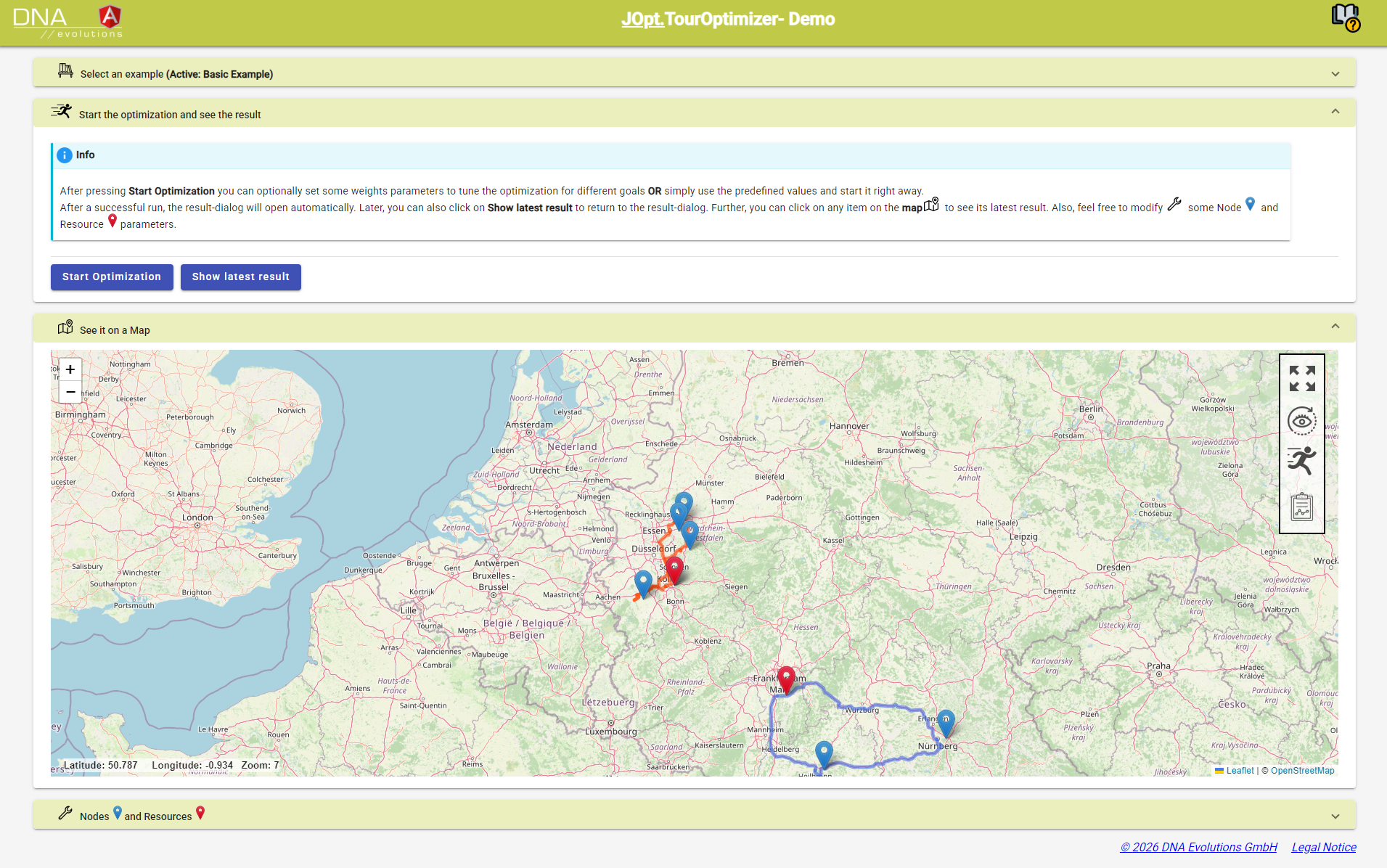
What the demo covers
- Scenario selection (examples)
- Optimization run trigger ("Start Optimization")
- Result access ("Show latest result")
- Map visualization (nodes/resources and resulting route polylines)
- Basic parameter tuning (weights/parameters in the UI)
What the demo does not cover
The demo is not a complete UI for the platform. It does not expose the full breadth of features such as:
- Rich constraint combinations (skills with levels, territories/zone governance, relations, PND variants, etc.)
- Performance engineering features (AutoFilter, performance mode, clustering strategies)
- Deep customization layers (OpenAssessor / custom rules)
- Full reporting, auditing, and diagnostics workflows
For full feature breadth, use the Documentation Hub Feature List and the example tracks (Base / Advanced / Expert).
Backend requirement (mandatory)
The Angular app is a client. You must provide a TourOptimizer REST endpoint.
If you are running the Angular client inside Docker (or any container), remember:
- Use
http://host.docker.internal:8081to reach a TourOptimizer server running on your host - Do not use
http://localhost:8081from inside the container
Architecture (high level)
- UI builds a request payload (snapshot + extension settings)
- UI calls TourOptimizer REST endpoints (OpenAPI/Swagger contract)
- UI receives progress / status (depending on endpoint usage)
- UI renders results and KPIs and draws routes on the map
A key benefit: the client is OpenAPI-driven, enabling typed request/response models and stable integration.
OpenAPI client generation (TypeScript)
The repo uses OpenAPI tooling to generate TypeScript/Angular models from the server’s Swagger/OpenAPI schema.
Referenced tooling:
- Angular CLI: https://angular.io/cli
- OpenAPI Generator CLI: https://www.npmjs.com/package/@openapitools/openapi-generator-cli
- OpenAPI Generator project: https://github.com/OpenAPITools/openapi-generator
- Angular Material: https://material.angular.io
- Reference article: https://www.mokkapps.de/blog/how-to-generate-angular-and-spring-code-from-open-api-specification
Using this repo as a template
Recommended path for developers:
- Replace example scenarios with your domain model (orders/jobs/resources/depots).
- Add auth/tenant handling (if required).
- Extend UI controls to expose the constraints you actually need.
- Keep the OpenAPI generation pipeline to stay aligned with backend schema updates.
Next steps
- REST client docs: /docs/learn-and-explore/rest/rest_client_touroptimizer
- REST server docs: /docs/learn-and-explore/rest/rest-server-touroptimizer
- Feature list: https://www.dna-evolutions.com/docs/learn-and-explore/features/featurelist